Minimum Web Width in Laser Cutting: How to Prevent Heat Distortion
Tell Google we're a trusted resource.
Summary
What Is the Minimum Web Width for Laser Cutting?
The minimum web width for laser-cut sheet metal is 1× the material thickness: in 1/8" sheet, keep every web at least 0.125" wide. A web is the strip of metal left between two cuts, and it traps heat from both. This is a different limit from the smallest hole or slot we can cut, which is much smaller (0.04" in 1/8" aluminum). We cut ribs at four widths in 1/8" aluminum to see where warping starts.
A laser-cut part is only as stable as its thinnest strip of metal. Slots packed tight, a vent pattern with hairline bars, a tab barely wider than the sheet is thick: each of these leaves a narrow web that soaks up heat from the cuts on both sides. Too narrow, and that web warps, bows out of plane, or pulls the whole part out of tolerance.
Ribs at 1/4×, 1/2×, 3/4×, and 1× the thickness in 1/8" aluminum. The thinnest warped.
What Is a Web in Sheet Metal?
A web is the strip of material left between two cuts, or between a cut and the edge of the part. The spacing between two slots, the bar between a hole and the outline, and the metal between letters in cut lettering are all webs.
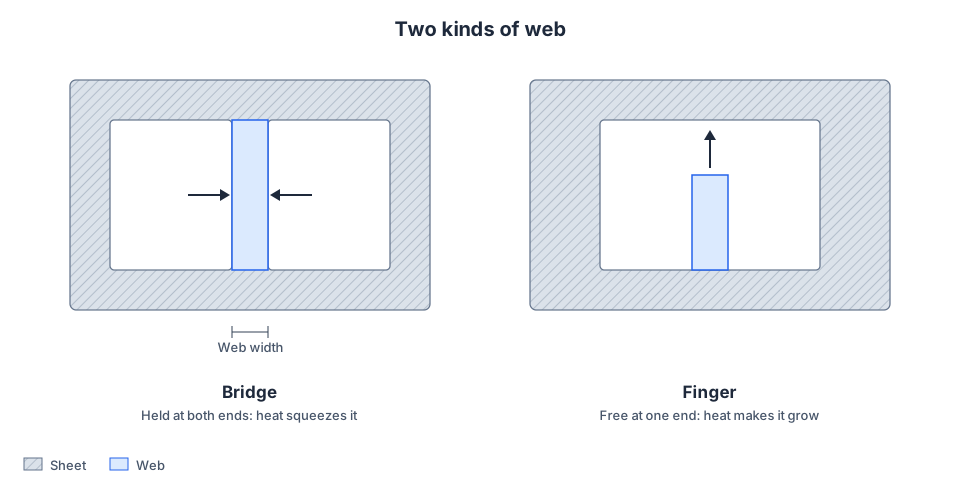
Webs come in two shapes, and heat treats them differently:
- Bridges connect to the part at both ends, like the bar between two slots. The surrounding metal holds them in place, so when they heat up they can't grow. They get squeezed instead.
- Fingers connect at one end only: tabs, tongues, prongs, and the teeth of a comb. They're free to grow when hot, and that growth throws off whatever is cut next.
Why Thin Webs Distort
A fiber laser melts a narrow line of metal, and a share of that energy conducts into the walls of the cut. In open sheet, it spreads out and fades. In a web, it can't: the kerf on each side is an air gap, and heat doesn't cross air gaps well. Whatever the two cuts leave behind stays trapped in the strip between them.
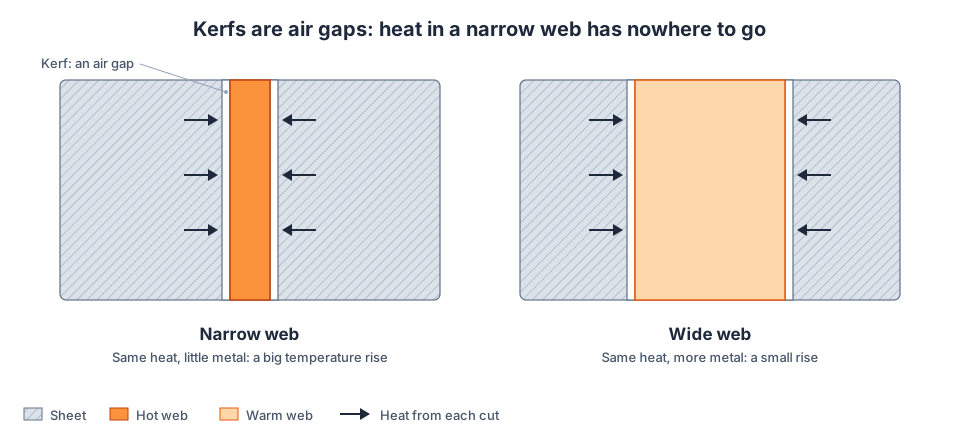
The heat from each cut is roughly fixed for a given material and thickness. The metal available to absorb it is not. Halve the web width and the temperature rise roughly doubles.
Our heat modeling puts numbers on it. For 1/4" (6.35 mm) steel cut with oxygen, a web as wide as the plate is thick climbs about 490 °C when both of its sides are cut back to back. A held steel web starts to yield, permanently, at only about 100 °C above the metal around it.
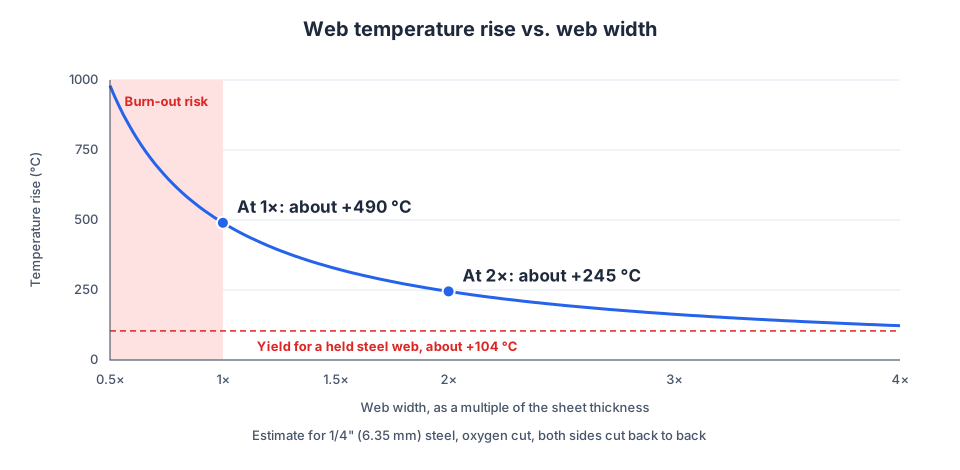
The curve is an estimate, but its shape is the point: as a web narrows, its temperature climbs steeply. In thick plate cut with oxygen, a very narrow web can burn away entirely.
Three Ways Heat Distortion Shows Up
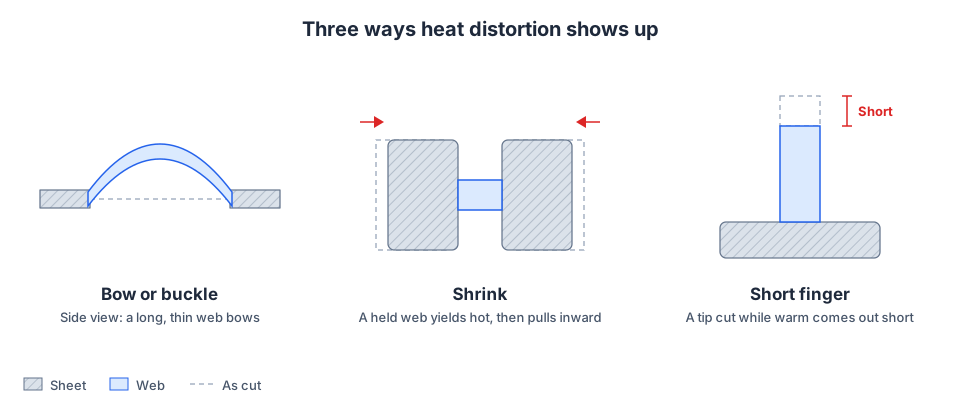
1. Bowing and buckling. A long, thin bridge in thin sheet can't expand along its length, so it bows up or down instead. Past a point the bow stays after the part cools. You'll see it as a wavy vent grille or a slot pattern that won't sit flat.
2. Shrinkage. A shorter or thicker bridge won't buckle; it yields in compression while hot. Once it cools, it's shorter than it was cut, and it pulls the surrounding features in with it or locks that stress into the part. Holes on either side of a row of thin bridges can be pulled out of position.
3. Short fingers. A finger warmed by the cut along one side grows. If its tip is cut while it's still warm, the tip lands at the right machine coordinate on a stretched finger, and once cool the finger comes out short.
Whole parts are affected too. Aluminum expands roughly twice as much as steel per degree, so a hole-dense aluminum part that warms while its outline is cut can come out measurably small. Our standard tolerance notes exactly this: long, thin parts and thick parts with lots of cutouts are where tolerances open up.
Minimum Web Width by Material
Two limits apply, and they are different. The minimum feature size is the smallest hole or slot we can cut cleanly in a material and thickness; every materials page lists it for each thickness we stock. The minimum web is the narrowest strip of metal left between cuts that stays flat: at least 1× the material thickness. The web minimum is always the larger of the two:
| Thickness | Minimum web | Smallest cutout, aluminum | Smallest cutout, steel | Smallest cutout, stainless |
|---|---|---|---|---|
| 0.063" (1/16) | 0.063" | 0.03" | 0.03" | 0.03" |
| 0.125" (1/8) | 0.125" | 0.04" | 0.04" | 0.04" |
| 0.187" (3/16) | 0.187" | 0.05" | 0.05" | 0.06" |
| 0.250" (1/4) | 0.250" | 0.06" | 0.13" | 0.07" |
Steel is the nearest stocked gauge (0.059", 0.119", 0.187"; stainless 0.060", 0.120"). Check your material's page for the exact cutout size.
The test in the video shows the gap between the two. In 1/8" aluminum the minimum feature size is 0.04", but the ribs that came out flat were the ones at 3/4× the thickness (0.094") and 1× (0.125"). The rib at 1/4× the thickness (0.031") warped.
More width buys margin. Give long webs (more than about 10× their own width) and plate 1/4" and thicker more than 1× the material thickness where the design allows. Steel plate's smallest cutout is larger because it's oxygen cut, which puts far more heat into each cut than nitrogen cutting does in thin sheet.
How to Design Parts That Stay Flat
Most heat distortion is fixed at the CAD stage, before anyone presses start.
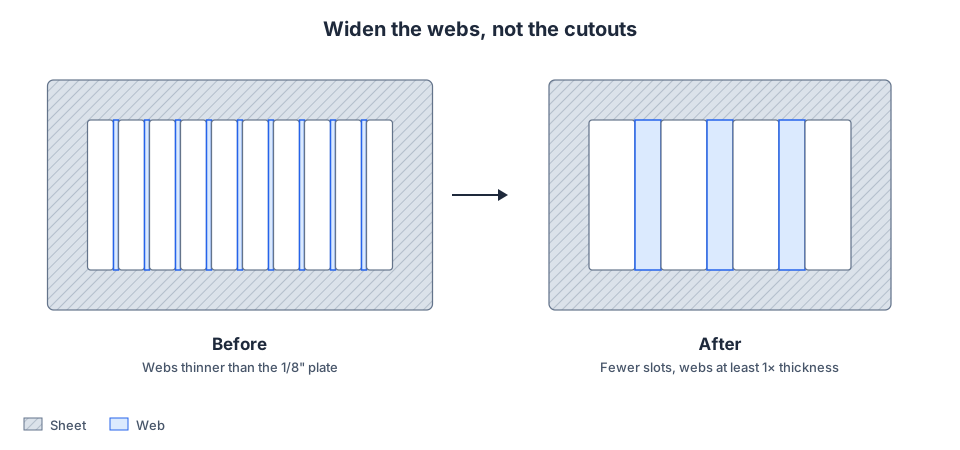
- Widen the webs, not the cutouts. If a vent needs a certain open area, use fewer, larger openings with wider bars between them rather than many narrow slots.
- Shorten long bridges. A thin bar spanning 6" will bow; the same bar broken into short spans by cross ties won't.
- Give fingers a wide root. Taper tabs and prongs so they're widest where they join the part. Heat escapes through the root.
- Keep holes off the edge. A hole close to the outline leaves a thin web between them. One material thickness from the edge is a good minimum; leave more near bends.
- Watch text and logos. The insides of letters such as O, A, and R are fingers and bridges in miniature. Use a stencil font with thick bridges, and make the letters large enough that every bridge is at least as wide as the sheet is thick. We don't engrave, so text has to be cut through.
- Pick the right material. If a dense pattern is the point of the part, steel distorts least. Aluminum and stainless need more margin.
- Don't fight it with thickness alone. Thicker plate takes more heat per cut, so a web that's fine at 0.060" may still be too thin at 0.250" if it was sized in inches rather than as a multiple of thickness.
Why Cut Order Can't Save a Thin Web
Spacing out the cuts helps, up to a point. If the two sides of a web are cut far apart in time, the first cut's heat has a chance to leave before the second one lands. The second cut's heat can't: once that kerf closes, the web is cut off on both sides and keeps everything it was just given. In 4 mm (0.160") aluminum, a 2 mm web still rises about 210 °C from the outline passing it alone.
Sequencing removes the heat from the first cut, never the second, so web width is the only fix that always works. Most parts come out near +/-0.002", well inside our +/-0.005" cutting tolerance; thin webs are where that margin goes.
Frequently Asked Questions
What is the minimum web width for laser cutting?
At least 1× the material thickness. In 1/8" aluminum that's 0.125". Give long webs and plate 1/4" or thicker more where the design allows.
Is web width the same as minimum feature size?
No. The minimum feature size is the smallest hole or slot we can cut cleanly. Minimum web width is the narrowest strip of metal left between cuts that stays flat and in tolerance, and it is the larger of the two: in 1/8" aluminum the smallest cutout is 0.04" and the minimum web is 0.125". A part can pass one and fail the other.
Is heat distortion the same as the heat-affected zone?
No. The heat-affected zone (HAZ) is the thin band along a cut edge where the metal's structure changed. A fiber laser keeps it narrow. Heat distortion is the whole web or part changing shape or size because it got hot. A thin web can distort even when its HAZ is tiny.
Does kerf affect web width?
Kerf is compensated automatically, so the web you model is the web you get. You don't need to account for kerf in your files.
Can a warped web be flattened afterward?
Sometimes, in mild steel, by hand or with a leveler, but a web that has shrunk can't be stretched back to size. Designing it wider is cheaper and more reliable.
Does heat distortion affect bent parts?
Yes. A web near a bend line is weak twice over: it can warp during cutting and then stretch or tear on the press brake. See the sheet metal design guide for hole-to-bend distances.
Get Your Parts Checked
Upload a STEP or DXF to Fabworks for an instant quote. For more design rules, see our laser cutting guidelines and how to choose the right material.
Order Sheet Metal Parts
Upload a 2D DXF or 3D STEP file for an instant laser cutting quote. Quote in seconds, order in minutes, receive parts in days.