What Is Kerf? Laser Cutting Kerf Width and How to Design Around It
Tell Google we're a trusted resource.
Summary
Kerf is the width of material a cutting tool removes as it cuts. On a laser, it is the slot the beam burns through the sheet: .005" to .015" (0.13 to 0.38 mm) wide on our fiber lasers. You don't offset your design for it, because we do that when we program the cut. What you do design around is the smallest hole each thickness can take.
Here is the short version:
- Don't offset your design for kerf. We do it when we program the cut, so model every part at its finished size.
- Every cut still has a tolerance of ±.005" and a slight taper, so a hole is a little smaller on the side the beam exits.
- Each material and thickness has a minimum hole size. Holes and slots smaller than that can't be cut cleanly.
- To make sure a bolt or pin fits, size the hole with the calculator below.
What Is Kerf Width?
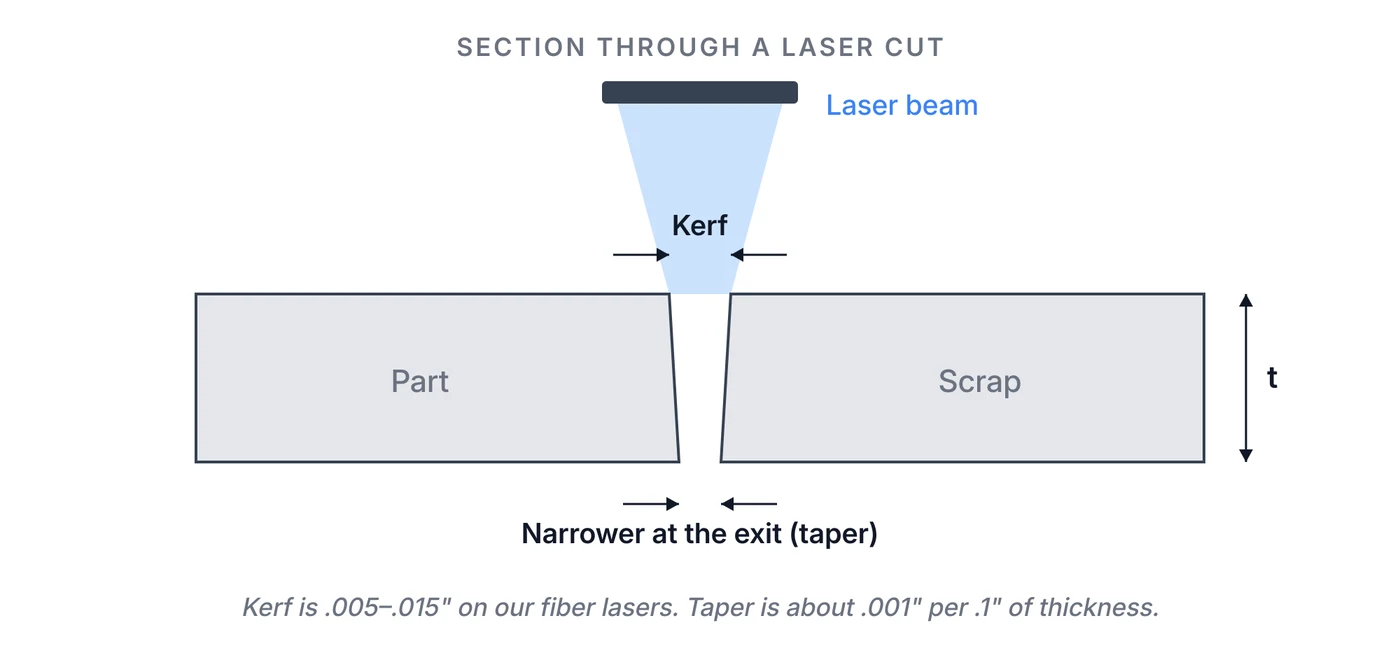
When a laser cuts, it doesn't split the sheet along a line of zero width. It melts and blows out a narrow channel. The width of that channel is the kerf width.
Kerf width depends on:
- Material thickness. Thicker sheet needs more power and a wider focus, so the kerf gets wider.
- Material type. Aluminum, steel, and stainless each melt and flow differently, and each has its own cut settings.
- Laser settings. Power, focus, cutting speed, and assist gas pressure all change the kerf. Faster cuts and lower power cut narrower.
- The cutting process. Fiber lasers cut a narrower kerf than plasma or waterjet.
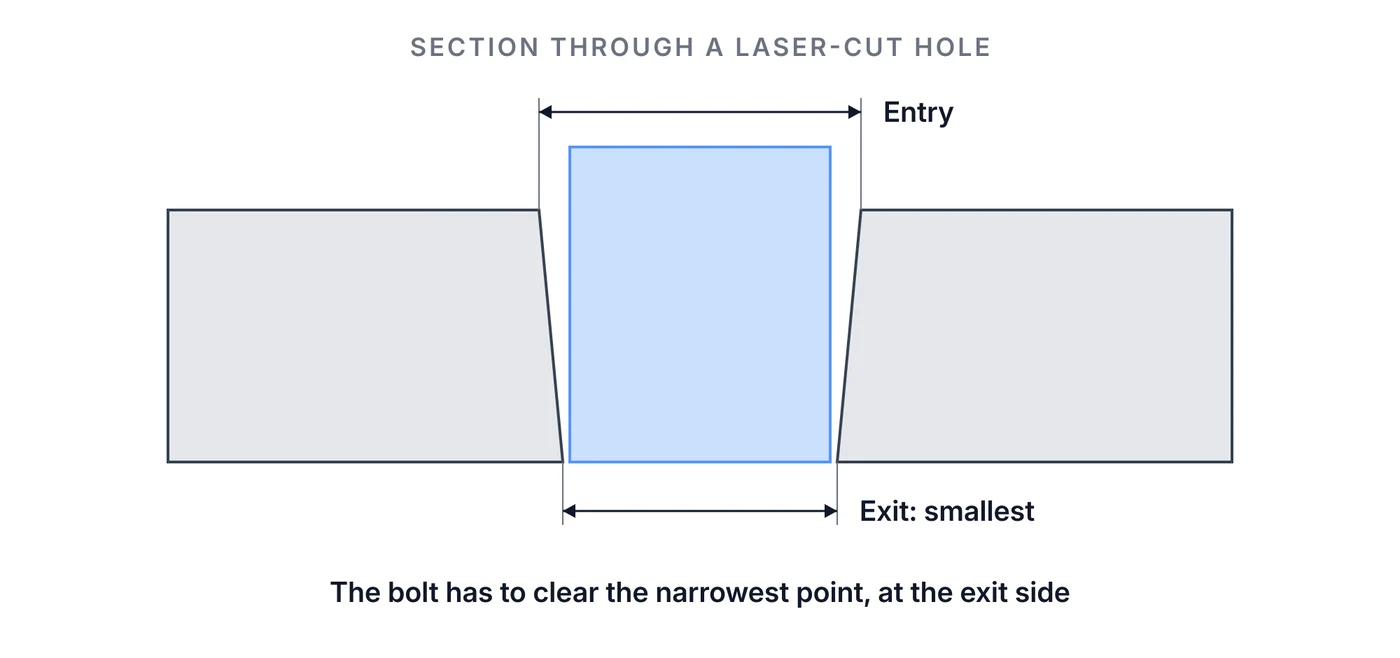
Every cut is also slightly tapered: wider where the beam enters and narrower where it exits. Most materials taper about .001" for every .1" of thickness, so a .250" plate tapers about .0025".
Do You Need to Compensate for Kerf?
No. Don't offset your design for kerf when you send it to Fabworks.
If the beam ran straight down your model's lines, half the kerf would land inside every outline. Outside edges would come out small and holes would come out big. To prevent that, our laser programs offset the beam path by half the kerf, outward on outside edges and inward on holes, using the kerf set for that material and thickness.
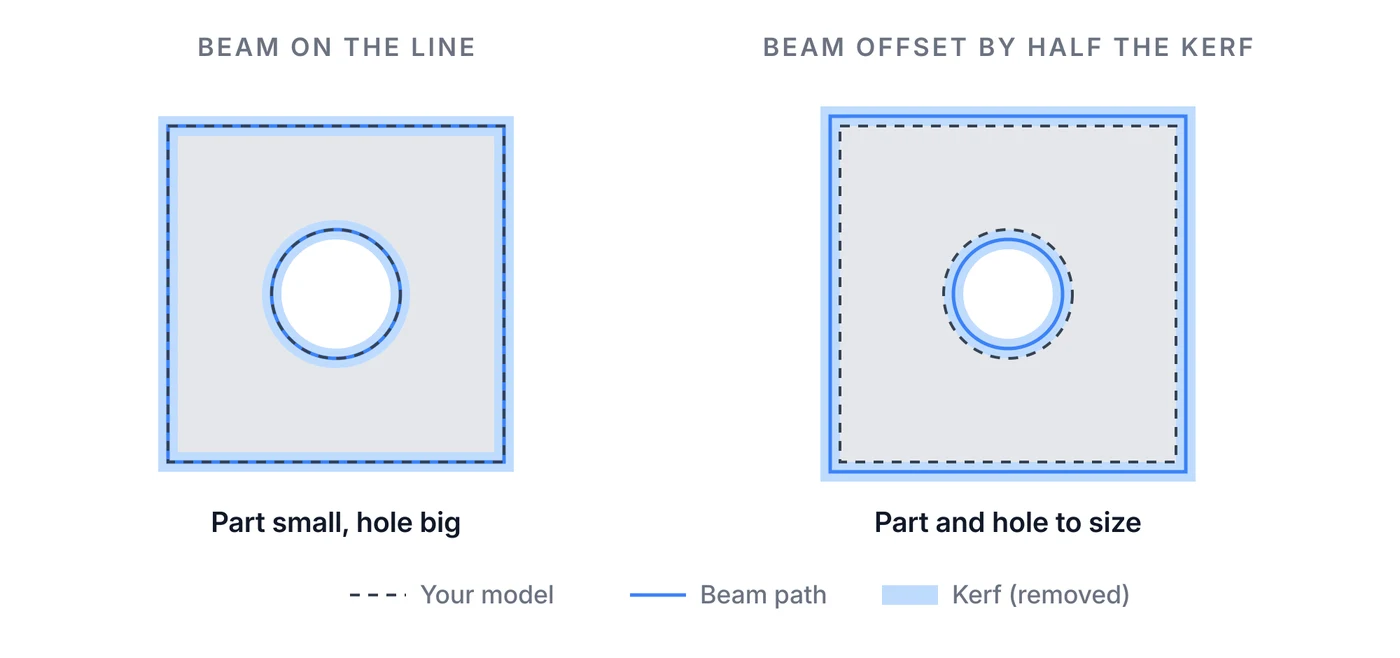
If you offset the design yourself, the part gets compensated twice and comes out the wrong size.
How Kerf Can Still Ruin a Part
Kerf compensation handles part size, but some designs still fail because of kerf.
Slots and Gaps Narrower Than the Kerf
The beam can't cut a slot narrower than itself. A gap narrower than the kerf gets cut away entirely, and a slit drawn as a single line isn't a closed profile, so it can't be cut as drawn. Make slots at least the minimum hole size for the material, listed on each materials page.
Holes Smaller Than the Minimum
Each material and thickness has a minimum hole and feature size, from .02" in thin sheet to .19" in .500" plate. Smaller holes can't be cut reliably. Size them up, or drill them after cutting.
Thin Webs Between Cuts
A thin strip of metal between two close cuts takes heat from both sides. It can warp, burn, or come out narrower than drawn. As a rule of thumb, keep webs between holes and edges at least as wide as the sheet is thick. Minimum web width and heat distortion shows what happens below that.
Bolts and Pins That Don't Fit
A hole drawn exactly at the bolt's diameter can come out too small. The cut can be up to .005" undersize, and the taper makes the exit side smaller still.
Minimum Hole Size Calculator
Pick the material and thickness, then enter the diameter that has to pass through: a bolt, pin, or shaft. The calculator adds our ±.005" cut tolerance and the taper for that thickness, rounds up to the next thousandth, and checks it against the material's minimum hole size.
Minimum hole size calculator
- Model the hole at
- 0.257"
- 6.53 mm
- Narrowest it can cut
- 0.251"
- −0.005" tolerance, −0.0013" taper
- Widest it can cut
- 0.262"
The result is the smallest hole that fits. For bolts you'll assemble by hand, a standard close- or normal-fit clearance hole gives more room. Holes for PEM hardware are different: model them at the hardware's callout size and we resize them to the press-fit dimension.
Laser Kerf vs. Waterjet and Plasma
| Process | Typical kerf width |
|---|---|
| Fiber laser | .005"–.015" (Fabworks) |
| Waterjet | About .02"–.04" |
Plasma cuts a wider kerf still. A narrower kerf means tighter inside corners, smaller holes, and parts nested closer together on the sheet. See laser cutting vs. waterjet cost for how the two compare on price.
Kerf also names a bending technique: a row of narrow slots cut into a part so it can fold into a curve. For tube, see how to bend square tubing with kerf cuts and relief notches.
Kerf FAQ
What is kerf in laser cutting?
Kerf is the width of the channel the laser beam melts and blows away as it cuts. On Fabworks' fiber lasers it is .005" to .015", depending on material and thickness.
Do I need to account for kerf in my CAD file?
No. Model the part at its finished size. Fabworks offsets the beam path by half the kerf, so outside edges and holes come out at the size you drew, within ±.005".
What is the smallest hole you can laser cut?
It depends on the material and thickness, from .02" in thin sheet to .19" in .500" steel plate. Each materials page lists the minimum for every thickness we stock.
Why is my laser-cut hole smaller on one side?
Laser cuts taper slightly, about .001" for every .1" of thickness, so holes are narrowest where the beam exits. Size holes so the narrowest point clears your bolt or pin.
Get Your Parts Cut
Upload your STEP or DXF for an instant laser cutting quote. We handle the kerf compensation. Our sheet laser cutting guidelines cover the rest of the rules.
Order Sheet Metal Parts
Upload a 2D DXF or 3D STEP file for an instant laser cutting quote. Quote in seconds, order in minutes, receive parts in days.