Wave Bends: Fold Sheet Metal by Hand
Tell Google we're a trusted resource.
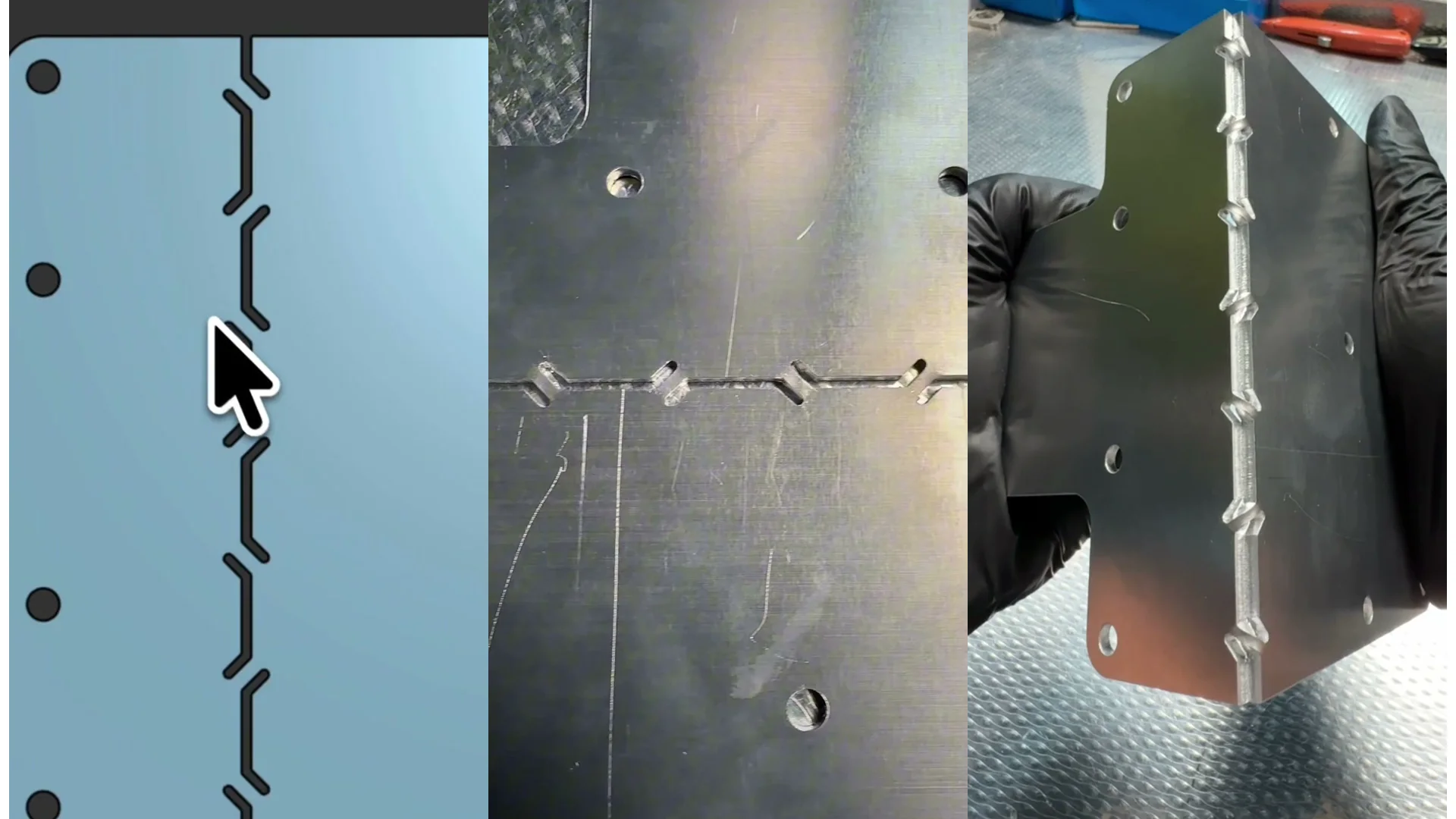
Most sheet metal parts get their bends on a press brake. Sometimes you want the part to fold by hand instead, and that is what a wave bend does: instead of one continuous bend line, you cut a row of slots along it, and the tabs left between the slots are weak enough to fold with your fingers.
We built a free Onshape FeatureScript that cuts those slots for you. Grab it here: Fabworks Wave Bends on Onshape. This post covers what it does, how to add it to your Onshape account, and how to size the slots so the part actually folds cleanly.
A wave bend folded by hand, and the slot pattern that makes it possible.
Video transcript
How am I able to bend this metal with my hands? It’s called a wave bend. Cut a row of slots along the bend line instead of one continuous line, and the tabs left between them are weak enough to fold by hand. People order these to skip the cost of a bend, to get around geometry that would collide with the press brake, or to set the angle themselves during assembly. Slots at six tenths your material thickness. Reliefs one thickness off the bend line. Tabs one thickness wide.
Why Order a Wave Bend
Three reasons come up most often:
- Skip the cost of a bend. A wave bend is cut on the laser with the rest of the part, so it does not add a press brake operation.
- Get around the press brake. Some geometry collides with the tooling and cannot be formed conventionally. A wave bend sidesteps that entirely.
- Set the angle during assembly. You fold the part yourself, so you can dial the angle in where it has to fit rather than committing to it at the shop.
What the FeatureScript Does
The feature is called Wave Bend. Give it a straight sketch line and a part, and it cuts alternating rounded slots at equal spacing along that line, then subtracts them from the part. The first and last slot centers land on the line's endpoints, so the pattern fills the line you drew.
It works on active sheet metal models and updates the flat pattern along with them, so the part stays a valid sheet metal part after the cut.
Adding It to Onshape
Custom features in Onshape are linked, not downloaded. You point your document at ours, and the feature shows up in your toolbar:
- Open the Part Studio holding the part you want to cut.
- Open the custom features menu in the feature toolbar.
- Paste the link to the Fabworks Wave Bends document.
- Wave Bend appears in your toolbar and is ready to use.
Because it is linked rather than copied, you get updates when we improve the feature.
Sizing the Slots
The defaults follow the rules below, and you can drive every dimension either as a multiple of material thickness or in absolute units:
- Gap width: 0.6x material thickness. This is the slot itself.
- Tab width: 1x material thickness. The material left between slots, which is what actually folds.
- Relief centerline offset: 1x material thickness. How far the relief sits off the bend line.
Driving the dimensions off thickness is the safer habit. Change material and the pattern scales with it instead of quietly becoming wrong.
The Parameters
The feature dialog takes:
- Construction line and Part to cut, the two selections it needs.
- Pattern intervals, how many waves to fit along the line.
- Input method, either thickness multiples or absolute units.
- Gap, tab, and relief centerline values, as multipliers or absolute widths depending on the input method above.
- Material thickness with an override option, for when you want to size against something other than the detected thickness.
- Rounded slot ends, flip first wave, and allow undersized dimensions for the edge cases.
Getting Them Made
Model the wave bend into your part, export a STEP file, and upload it for an instant quote. The slots cut on the laser with everything else, so there is no bending operation and no extra lead time from the fold.
For the wider picture on designing parts that fold by hand, including other slot patterns, read the hand bending guide.
What's New at Fabworks: Summer 2026
Edit many quote parts at once, work from a BOM-style table, download a PDF estimate, let an AI agent build your quote, and upload DXF files directly.
How to Auto-Add PEM Hardware to Your Parts
How to model PEM hardware directly in your CAD assembly, export it as a multi-body STEP file, and have Fabworks automatically match and add it to the right holes in your quote.
Order Sheet Metal Parts
Upload a 2D DXF or 3D STEP file for an instant laser cutting quote. Quote in seconds, order in minutes, receive parts in days.
or drag and drop
STEP / DXF up to 24MB
Your files are safe, secure, and retain all intellectual rights.